> ## Documentation Index
> Fetch the complete documentation index at: https://docs.readinessrecord.co.uk/llms.txt
> Use this file to discover all available pages before exploring further.
# Running an assessment
> Creating a new assessment, Standard vs Extended depth, and what a run costs
## Creating an assessment
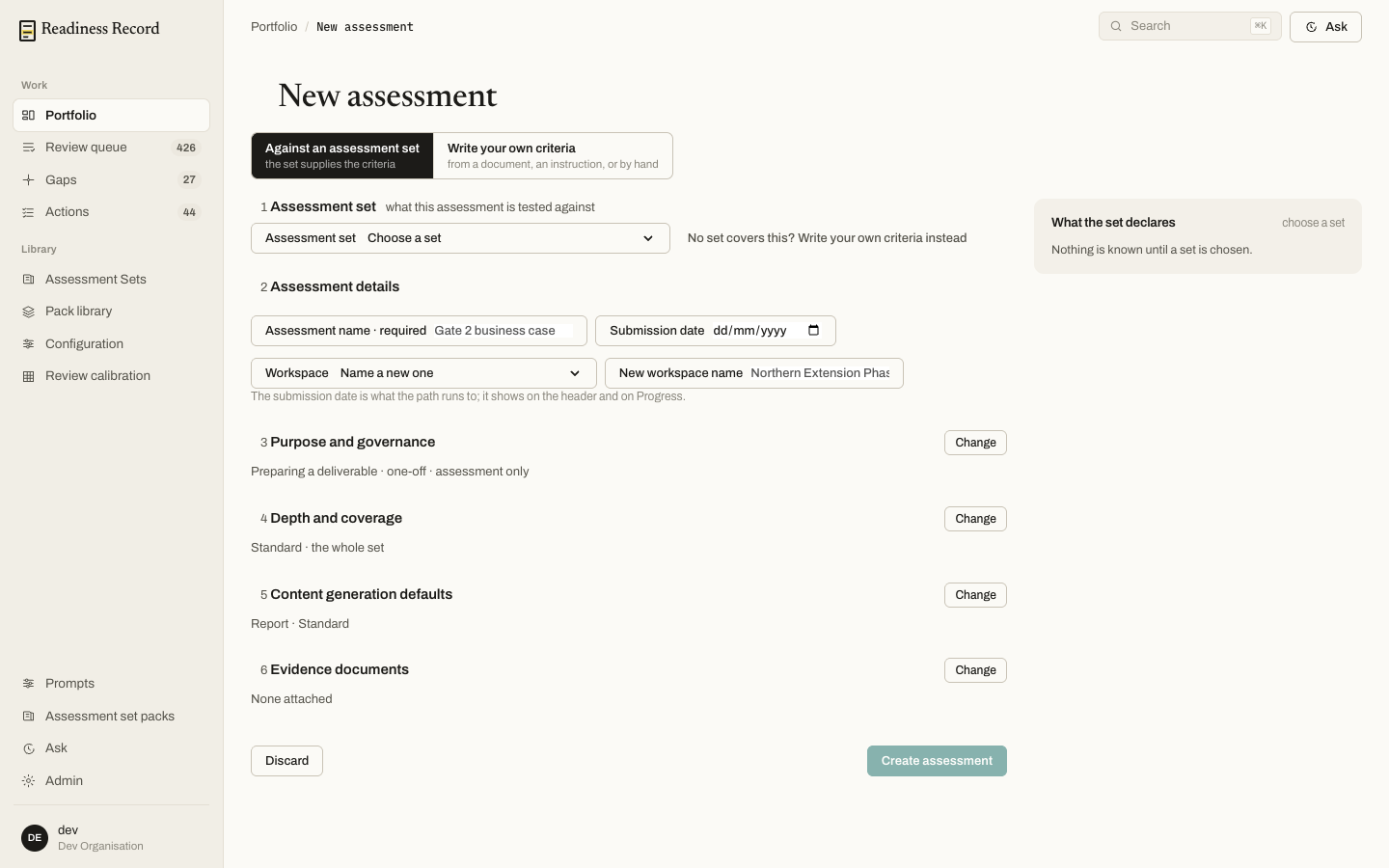
From the Portfolio, click **New assessment**. You choose between:
* **Against an assessment set** — the set supplies the criteria.
* **Write your own criteria** — from a document, an instruction, or by hand.
 Then work through:
1. **Assessment set** — what this assessment is tested against.
2. **Assessment details** — a required name, an optional submission date (the date the whole assessment works towards — it drives Progress and shows in the header), and the workspace it belongs to (an existing one, or name a new one).
3. **Purpose and governance** — e.g. preparing a deliverable, one-off, assessment only.
4. **Depth and coverage** — see below.
5. **Content generation defaults** — the default depth for generated report content.
6. **Evidence documents** — attach what you already have, or add them afterwards on Evidence & Runs.
## Standard vs Extended
This is the choice that governs how thoroughly the engine reads your documents, and it directly sets how much a run costs.
Then work through:
1. **Assessment set** — what this assessment is tested against.
2. **Assessment details** — a required name, an optional submission date (the date the whole assessment works towards — it drives Progress and shows in the header), and the workspace it belongs to (an existing one, or name a new one).
3. **Purpose and governance** — e.g. preparing a deliverable, one-off, assessment only.
4. **Depth and coverage** — see below.
5. **Content generation defaults** — the default depth for generated report content.
6. **Evidence documents** — attach what you already have, or add them afterwards on Evidence & Runs.
## Standard vs Extended
This is the choice that governs how thoroughly the engine reads your documents, and it directly sets how much a run costs.
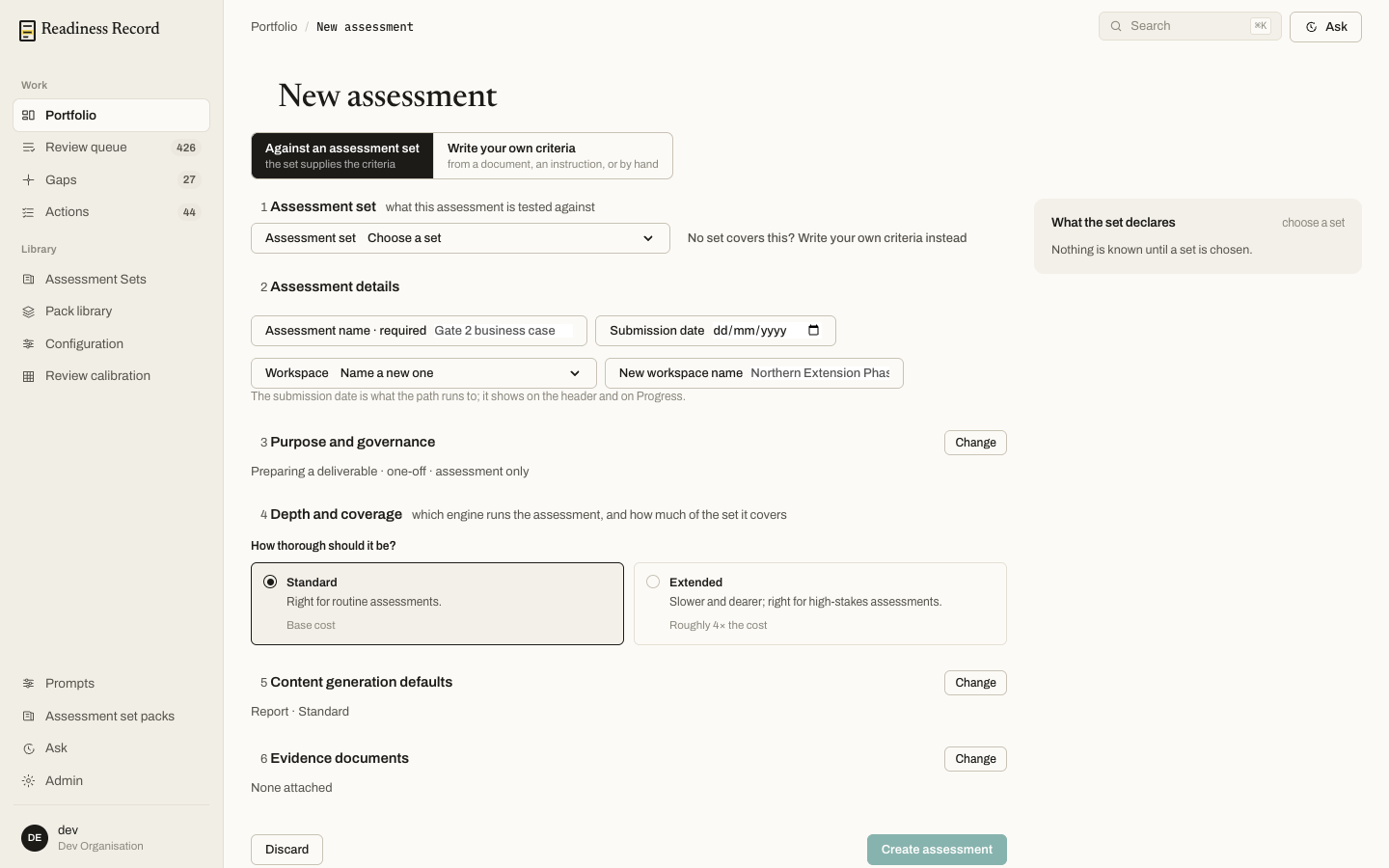 * **Standard** — right for routine assessments. This is the base cost and the default.
* **Extended** — slower and dearer; right for high-stakes assessments. Roughly **4× the cost** of Standard.
Choose Extended only when the assessment genuinely warrants the deeper, more expensive pass — a gateway decision or a high-stakes submission, not a routine check.
## What a run costs, in practice
Every run calls the assessment engine and Azure's document-reading service, and both are billed per use. A run against a full set (around 49 criteria on a typical gateway framework) is a real cost, not a trivial one, and Extended is materially more again. Re-running an assessment, and the "re-assess" action on an individual criterion, both trigger a full run — there is no cheaper partial option. Plan runs accordingly: get your documents right first, and choose Standard unless you specifically need Extended's depth.
## After you start a run
The **Evidence & Runs** tab tracks each run: criteria read, what moved since the previous run, and which documents drove the change. See [Documents](/sops/02-documents).
## What's next
* **[Results](/sops/05-results)** — see what the run found
* **[Findings Review](/sops/06-findings-review)** — decide each finding
* **Standard** — right for routine assessments. This is the base cost and the default.
* **Extended** — slower and dearer; right for high-stakes assessments. Roughly **4× the cost** of Standard.
Choose Extended only when the assessment genuinely warrants the deeper, more expensive pass — a gateway decision or a high-stakes submission, not a routine check.
## What a run costs, in practice
Every run calls the assessment engine and Azure's document-reading service, and both are billed per use. A run against a full set (around 49 criteria on a typical gateway framework) is a real cost, not a trivial one, and Extended is materially more again. Re-running an assessment, and the "re-assess" action on an individual criterion, both trigger a full run — there is no cheaper partial option. Plan runs accordingly: get your documents right first, and choose Standard unless you specifically need Extended's depth.
## After you start a run
The **Evidence & Runs** tab tracks each run: criteria read, what moved since the previous run, and which documents drove the change. See [Documents](/sops/02-documents).
## What's next
* **[Results](/sops/05-results)** — see what the run found
* **[Findings Review](/sops/06-findings-review)** — decide each finding